# How to Node Stake on Presearch Web3

1. Log in to your [presearch account](https://presearch.com/), you can follow the tutorial here: [Presearch Web3 Login](https://docs.presearch.io/presearch-web-3.0/presearch-web3-login)
2. Enter your account menu: [My Account](https://account.presearch.com/) and click on Web3 dashboard.

<figure><img src="https://881106330-files.gitbook.io/~/files/v0/b/gitbook-x-prod.appspot.com/o/spaces%2F-MS4taefedlYJ7UrPHAo%2Fuploads%2FdGyb6yBvHLNDhtgh8Ah0%2Fimage.png?alt=media&#x26;token=75ab9995-9343-4301-86d3-0252775c124a" alt=""><figcaption></figcaption></figure>

3. Click on Visit Dashboard within **Node Stake Balance.**

<figure><img src="https://881106330-files.gitbook.io/~/files/v0/b/gitbook-x-prod.appspot.com/o/spaces%2F-MS4taefedlYJ7UrPHAo%2Fuploads%2FGjdZ4q07sAYQCK84QayC%2Fnodo1.jpg?alt=media&#x26;token=caf353d1-5593-4457-879c-ea8339664f22" alt=""><figcaption></figcaption></figure>

4. Scroll down to the **¨Current Nodes¨** section and click on stake.

<figure><img src="https://881106330-files.gitbook.io/~/files/v0/b/gitbook-x-prod.appspot.com/o/spaces%2F-MS4taefedlYJ7UrPHAo%2Fuploads%2FKKi5Gln7xznrN93299Bl%2Fstake1.jpg?alt=media&#x26;token=a621a7e1-382d-4572-8370-cb98e72e2019" alt=""><figcaption></figcaption></figure>

5. Enter the stake amount manually and click Update Stake.

<figure><img src="https://881106330-files.gitbook.io/~/files/v0/b/gitbook-x-prod.appspot.com/o/spaces%2F-MS4taefedlYJ7UrPHAo%2Fuploads%2Fe92msa9yq6aI8vunwsZE%2Fdado1.jpg?alt=media&#x26;token=2376a421-cbde-40a7-8cba-b4c289998951" alt=""><figcaption></figcaption></figure>

6. Approve the transaction and then confirm it in your external wallet **(Metamask, coinbase wallet, ect).**

<figure><img src="https://881106330-files.gitbook.io/~/files/v0/b/gitbook-x-prod.appspot.com/o/spaces%2F-MS4taefedlYJ7UrPHAo%2Fuploads%2F7LDpGTyvEMnzHNUHZHY6%2Fpala1.jpg?alt=media&#x26;token=21d12333-0062-478a-87b5-f50128045170" alt=""><figcaption></figcaption></figure>

<figure><img src="https://881106330-files.gitbook.io/~/files/v0/b/gitbook-x-prod.appspot.com/o/spaces%2F-MS4taefedlYJ7UrPHAo%2Fuploads%2FIrY2Hw9AMIoa8pkVDY3g%2Fuva2.jpg?alt=media&#x26;token=9b5aa303-f67c-4702-b33a-70d769c3547d" alt=""><figcaption></figcaption></figure>

<figure><img src="https://881106330-files.gitbook.io/~/files/v0/b/gitbook-x-prod.appspot.com/o/spaces%2F-MS4taefedlYJ7UrPHAo%2Fuploads%2FnDeUZ67kmd4oc4p4lhll%2Fyoyo1.jpg?alt=media&#x26;token=ae10b40e-2c5f-4c2a-ab7c-f1d665bb94a3" alt=""><figcaption></figcaption></figure>

7. You will now be able to see the PRE stake on your **Node Dashboard** and you will also be able to see it in **Transfer History.**

<figure><img src="https://881106330-files.gitbook.io/~/files/v0/b/gitbook-x-prod.appspot.com/o/spaces%2F-MS4taefedlYJ7UrPHAo%2Fuploads%2FP39LLt8KZEnCcWmeUlvu%2Ftos1.jpg?alt=media&#x26;token=9dff6493-cb0d-496e-a038-0c0e5fae285a" alt=""><figcaption></figcaption></figure>

<figure><img src="https://881106330-files.gitbook.io/~/files/v0/b/gitbook-x-prod.appspot.com/o/spaces%2F-MS4taefedlYJ7UrPHAo%2Fuploads%2Fiw3dw9pkxIt2HVXeBrYr%2Fgul1.jpg?alt=media&#x26;token=371be7de-f346-470a-80d8-2e6b61128fce" alt=""><figcaption></figcaption></figure>

## Unstake Search Stake

1. On your web3 dashboard Click on Visit Dashboard within **Node Stake Balance.**

<figure><img src="https://881106330-files.gitbook.io/~/files/v0/b/gitbook-x-prod.appspot.com/o/spaces%2F-MS4taefedlYJ7UrPHAo%2Fuploads%2Fl4pmY6rqC29M0u01Ah3O%2Fimage.png?alt=media&#x26;token=8dc8a870-3fa7-4311-ab40-ba08e0e25905" alt=""><figcaption></figcaption></figure>

2. Scroll down to the **¨Current Nodes¨** section and click on stake.

<figure><img src="https://881106330-files.gitbook.io/~/files/v0/b/gitbook-x-prod.appspot.com/o/spaces%2F-MS4taefedlYJ7UrPHAo%2Fuploads%2Fbrx4DLXPUwjYuwmBNbue%2Fimage.png?alt=media&#x26;token=9d03d896-a7d2-41e7-9cf9-41709af74bea" alt=""><figcaption></figcaption></figure>

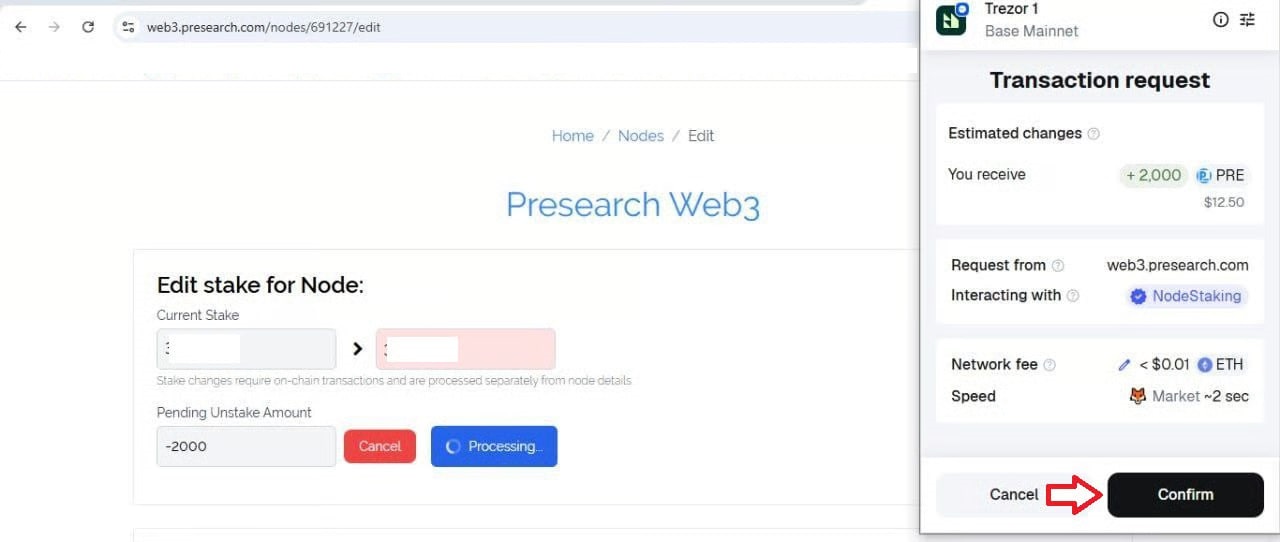
3. Enter the Stake amount manually or set it to 0 if you want to withdraw all the Pre from the node and click Update Stake.

<figure><img src="https://881106330-files.gitbook.io/~/files/v0/b/gitbook-x-prod.appspot.com/o/spaces%2F-MS4taefedlYJ7UrPHAo%2Fuploads%2FapWzKF2x2A95lbiL5toc%2Fsopa1.jpg?alt=media&#x26;token=8e737f2e-4e35-4f3b-9761-a7cb1af75007" alt=""><figcaption></figcaption></figure>

4. Click on Unstake.

<figure><img src="https://881106330-files.gitbook.io/~/files/v0/b/gitbook-x-prod.appspot.com/o/spaces%2F-MS4taefedlYJ7UrPHAo%2Fuploads%2FcjDO9iGPKW2PiAeOnJpF%2Fweb1.jpg?alt=media&#x26;token=ca1113f8-1bd0-4bde-ab07-ac1ea5e76c18" alt=""><figcaption></figcaption></figure>

5. Confirm the transaction and you will have the tokens inside your external wallet.

<figure><img src="https://881106330-files.gitbook.io/~/files/v0/b/gitbook-x-prod.appspot.com/o/spaces%2F-MS4taefedlYJ7UrPHAo%2Fuploads%2FQdc3YbkCczMSSibTpSDm%2Fselpoor1.jpg?alt=media&#x26;token=04e3f1f0-18a0-4c08-9ca3-07c8ad63b32b" alt=""><figcaption></figcaption></figure>

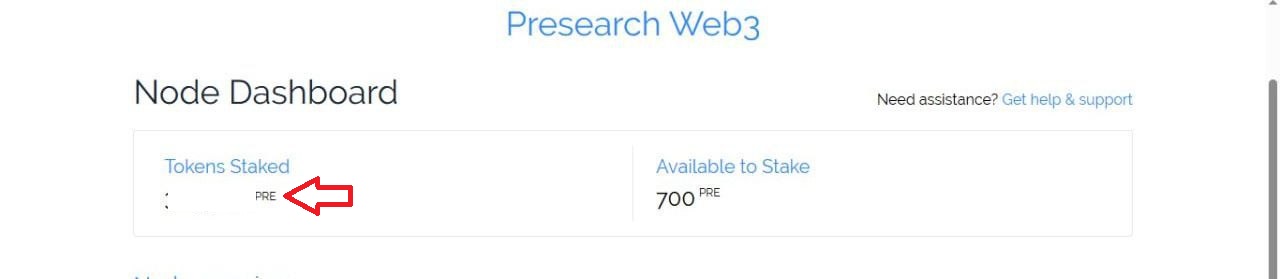
6. You will be able to see that it has been successfully Unstake and you will also be able to see it in the transaction history.

<figure><img src="https://881106330-files.gitbook.io/~/files/v0/b/gitbook-x-prod.appspot.com/o/spaces%2F-MS4taefedlYJ7UrPHAo%2Fuploads%2FvhdTXAJJEXXMucE8kL2O%2Fisa1.jpg?alt=media&#x26;token=dd361a9c-55dc-43b4-9c78-bae83952e772" alt=""><figcaption></figcaption></figure>

<figure><img src="https://881106330-files.gitbook.io/~/files/v0/b/gitbook-x-prod.appspot.com/o/spaces%2F-MS4taefedlYJ7UrPHAo%2Fuploads%2FRtK5ApVD51g1rXbErfZP%2Fpelele1.jpg?alt=media&#x26;token=14971514-7de5-4268-9f06-08b02bbbcf57" alt=""><figcaption></figcaption></figure>

### Youtube link <a href="#youtube-link" id="youtube-link"></a>

Node Staking in Web3 Made Easy | Presearch’s Step-by-Step Guide.

{% embed url="<https://www.youtube.com/watch?v=FU7vw4u9eQE&t=1s>" %}

<br>