# How to Deposit Tokens on the Presearch Web3 Platform

1. Log in to your [presearch account](https://presearch.com/), you can follow the tutorial here: [Presearch Web3 Login](https://docs.presearch.io/presearch-web-3.0/presearch-web3-login)
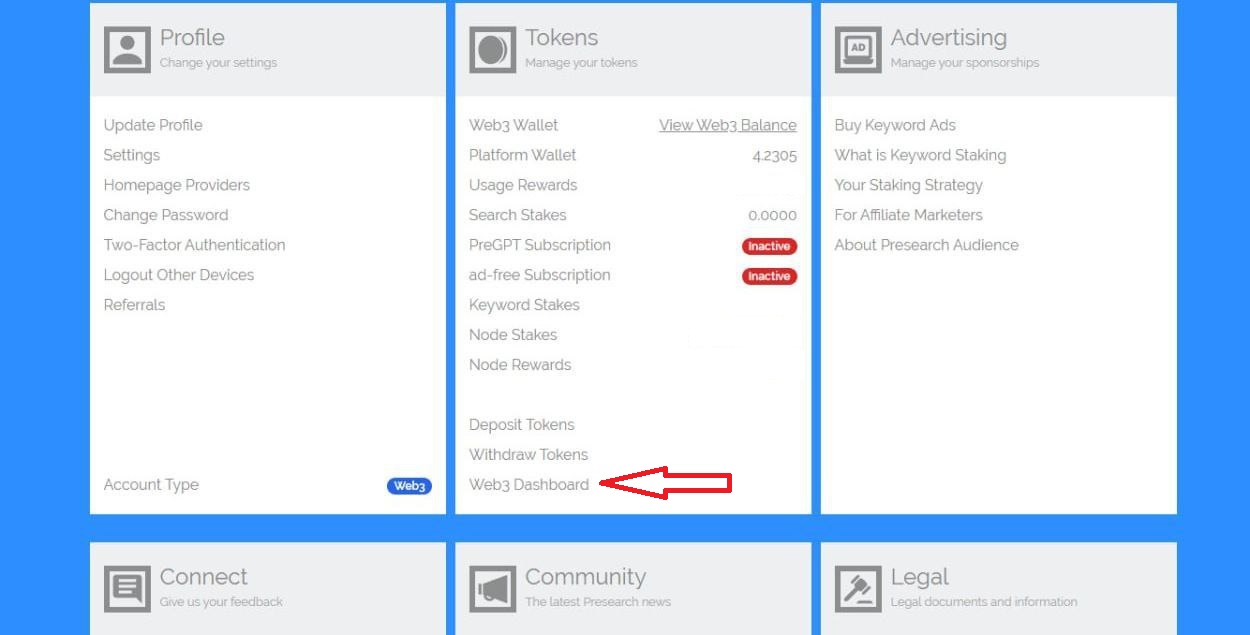
2. Enter your account menu: [My Account](https://account.presearch.com/) and click on Web3 dashboard.

<figure><img src="https://881106330-files.gitbook.io/~/files/v0/b/gitbook-x-prod.appspot.com/o/spaces%2F-MS4taefedlYJ7UrPHAo%2Fuploads%2FpPpbkb5gPkCTPetfXs8h%2Fsopo1.jpg?alt=media&#x26;token=3c3b8233-9f99-49cd-9069-5ff0859f1bd7" alt=""><figcaption></figcaption></figure>

3. Click on Visit Dashboard within the Platform Wallet Balance.

<figure><img src="https://881106330-files.gitbook.io/~/files/v0/b/gitbook-x-prod.appspot.com/o/spaces%2F-MS4taefedlYJ7UrPHAo%2Fuploads%2F7778nvMm6gdH1GUHieLA%2Fwelcome1.jpg?alt=media&#x26;token=8ec96a2f-80e9-4fc5-bc20-11905ce822c7" alt=""><figcaption></figcaption></figure>

4. Click on deposit and then copy the deposit address.

<figure><img src="https://881106330-files.gitbook.io/~/files/v0/b/gitbook-x-prod.appspot.com/o/spaces%2F-MS4taefedlYJ7UrPHAo%2Fuploads%2FnlY0EUhpI36Wlkn81QBU%2Fdeposit1.jpg?alt=media&#x26;token=6a044e2b-0323-44df-ab18-a2243c3d4f00" alt=""><figcaption></figcaption></figure>

<figure><img src="https://881106330-files.gitbook.io/~/files/v0/b/gitbook-x-prod.appspot.com/o/spaces%2F-MS4taefedlYJ7UrPHAo%2Fuploads%2FitgHCjtih3FYGbWVVXgN%2Fmono.jpg?alt=media&#x26;token=b48954e0-26e4-4098-a189-89978d5dfe92" alt=""><figcaption></figcaption></figure>

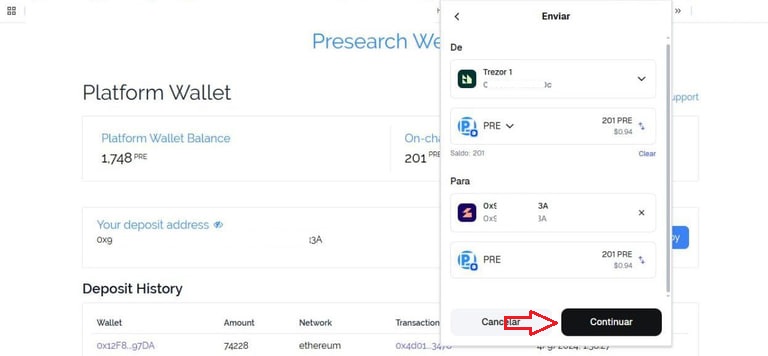
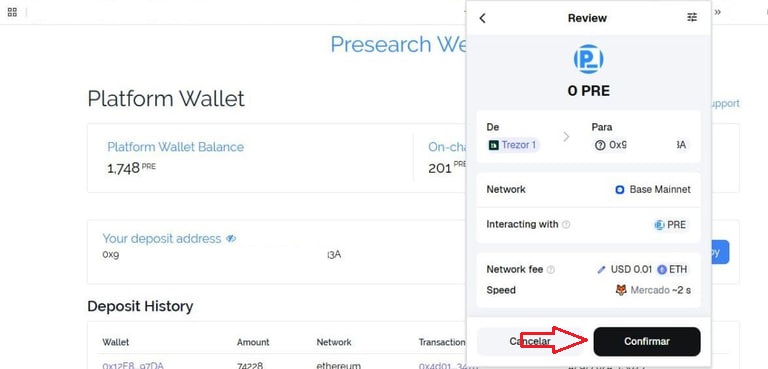
5. Open your external wallet, select PRE, send, and enter your presearch account address, then confirm the transaction.

<figure><img src="https://881106330-files.gitbook.io/~/files/v0/b/gitbook-x-prod.appspot.com/o/spaces%2F-MS4taefedlYJ7UrPHAo%2Fuploads%2FcRBHejcztQ2Q20NumBno%2Fflecha2.jpg?alt=media&#x26;token=e5f63475-dff1-48e1-857d-46648d078eb6" alt=""><figcaption></figcaption></figure>

<figure><img src="https://881106330-files.gitbook.io/~/files/v0/b/gitbook-x-prod.appspot.com/o/spaces%2F-MS4taefedlYJ7UrPHAo%2Fuploads%2F3I8XRQdHnWlogROgJKsv%2Flapiz2.jpg?alt=media&#x26;token=442f6934-83e5-4dcf-9cce-4ab0f09ff4e5" alt=""><figcaption></figcaption></figure>

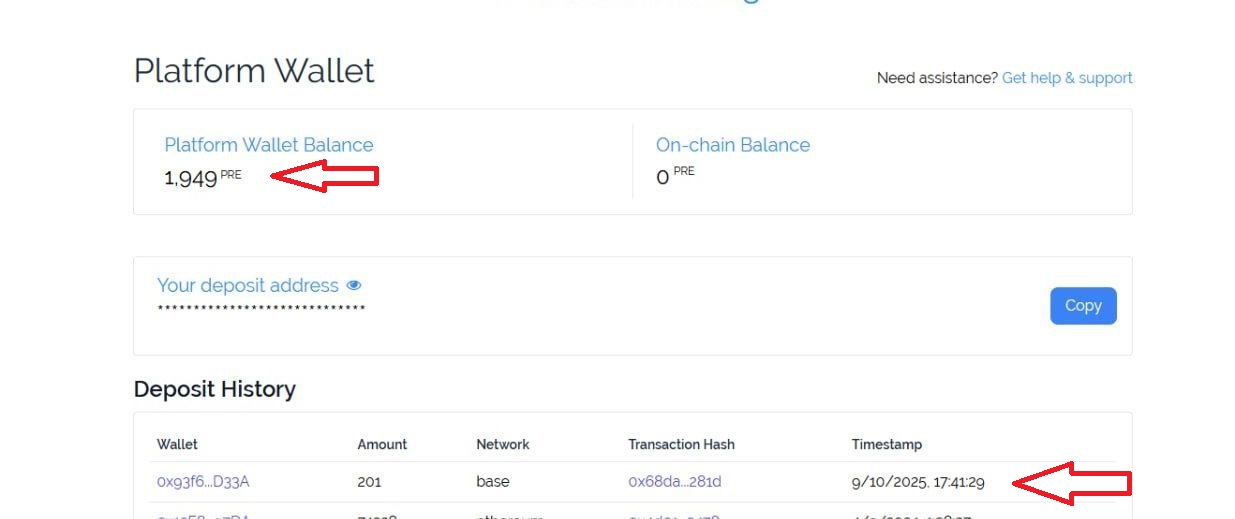
6. You will be able to see your deposit within the platform wallet and you will also be able to monitor it in the deposit history.&#x20;

<figure><img src="https://881106330-files.gitbook.io/~/files/v0/b/gitbook-x-prod.appspot.com/o/spaces%2F-MS4taefedlYJ7UrPHAo%2Fuploads%2FJmHzt8CSZ1oUgoCfN33S%2Ffinal1.jpg?alt=media&#x26;token=0808abc5-c32c-4330-9056-ed4c7487eba4" alt=""><figcaption></figcaption></figure>

### Youtube link <a href="#youtube-link" id="youtube-link"></a>

Unlock Your Presearch Rewards | How to Deposit Tokens onto the Presearch Platform

{% embed url="<https://www.youtube.com/watch?v=Fn0ci1jiDR0>" %}

<br>

<br>

<br>

<br>